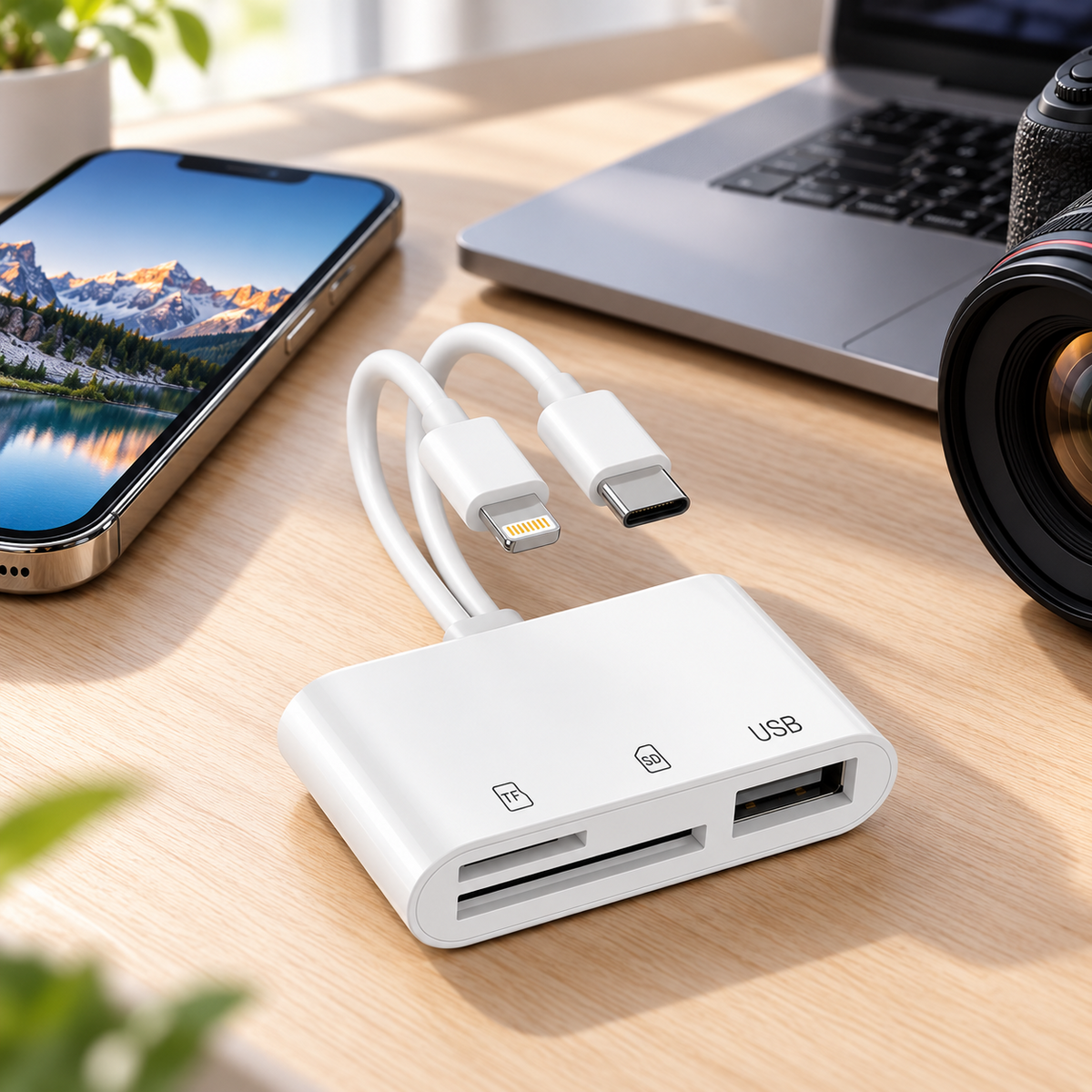
5-in-1 Memory Card Reader | USB-C + 8-Pin
Two Connectors. Three Expansion Ports. One Compact Reader.
Connect through USB-C or 8-Pin and access SD, TF/microSD and USB devices with one easy-to-carry adapter.
5-IN-1 DUAL-CONNECTOR CARD READER
One Reader, Five Connections combines two device connectors with three practical expansion ports for everyday file access and device connectivity.
Built with USB-C + 8-Pin dual connectors so one compact reader can work across more of the phones, tablets and computers you use every day.
Three built-in expansion options give you access to SD, TF/microSD and USB without carrying separate card readers and adapters.
Quickly move photos, videos and files between compatible cameras, memory cards, phones, tablets and computers.
Designed for plug-and-play convenience so you can connect and start using the reader without a complicated setup process.
The USB expansion port adds practical OTG connectivity for compatible USB devices such as flash drives, keyboards, mice and other everyday accessories.
A compact all-in-one design helps replace several separate adapters—ideal for travel, work, photo transfer and everyday carry.
Special Offer Bundle
Couldn't load pickup availability

💾 5-in-1 Memory Card Reader | USB-C + 8-Pin
For the files you want to take with you
Your files.
Ready for the next device.
Bring camera photos, videos and everyday documents to a compatible phone, tablet or computer. Two connector options and three storage ports, in one compact white reader.
USB-C + Lightning (8-pin) · SD + TF/microSD + USB-A

Use the connector that matches your device. Compatibility depends on your device, operating system and storage format.
A simpler way to reach your files
Less searching for adapters.
More getting on with your day.
A camera card, a flash drive, a different phone connection. Keep the essentials together, so your next file transfer starts with the right connection.
Camera to screen
Bring the photos with you.
Open supported photos and videos from your camera’s memory card on a compatible device.
Desk to device
Keep work within reach.
Access documents on a compatible USB flash drive when you move between supported devices.
Everyday carry
Make room in your bag.
Carry one small reader with your cards and cables, at your desk or on your next trip.
Two connectors. Three storage connections.
Know what connects where.
Choose USB-C or Lightning (8-pin) for your compatible device, then use the slot or port that matches your storage.
Device connector
USB-C
For compatible USB-C phones, tablets and computers.
Device connector
Lightning (8-pin)
For compatible devices with a Lightning port.

01 / Storage
SD slot
For supported SD memory cards.
02 / Storage
TF / microSD slot
For supported microSD memory cards.
03 / Storage
USB-A port
For supported USB storage devices.
Port availability does not guarantee simultaneous use. Supported card types, capacities and accessories depend on the connected device and system.
From connection to access
Four straightforward steps.
No separate desktop driver is typically needed on supported systems. File access still depends on your device and the app it uses.
Insert your storage
Place a compatible SD or TF/microSD card into its matching slot, or connect a supported USB storage device.
Choose the matching connector
Connect the reader to your compatible device using USB-C or Lightning (8-pin).
Open and transfer
Use your device’s supported file-management or photo-import app. Allow access if your device asks.
Finish, then disconnect
Wait until copying has finished. Eject the storage if your device offers that option, then unplug the reader.
Before you order
A good fit starts
with compatibility.
Check these three things to choose with confidence.
1. Your device’s port
Match the physical connector: USB-C or Lightning (8-pin). A matching plug alone does not guarantee support.
2. External-storage support
Your device and operating system must support reading external storage through the chosen connection.
3. Your card and file format
Check that your card format, capacity and file types are supported by the device and the app you plan to use.
Have a question? Contact JEREMYTIS® with your device model and the card or USB drive you want to use.
The details, in one place
Small enough to take along.
- Product
- 5-in-1 Multi-Port Memory Card Reader
- Brand
- JEREMYTIS®
- Color / material
- White / ABS
- Body dimensions
- 44 × 26 × 10 mm
Approx. 1.73 × 1.02 × 0.39 in - Cable length
- 13.5 cm / approx. 5.31 in
- Device connectors
- USB-C + Lightning (8-pin)
- Storage connections
- SD slot + TF/microSD slot + USB-A port
- Compatibility
- Device, operating system, storage format and app dependent
In the box
1 × JEREMYTIS® card reader
Phones, computers, memory cards and other accessories shown are for illustration and are not included.
A few useful answers
Before you plug in.
Will it work with every phone or tablet?
No. Check the connector, external-storage support, operating system and storage format. Compatibility varies between devices, even when the connector fits.
Do I need to install software?
A separate desktop driver is typically not required on supported systems. You will still need a supported file-management or photo-import app and may need to grant access permissions.
Does the reader add built-in storage?
No. It provides access to compatible memory cards and USB storage. Storage media are separate items.
Can I read both cards or charge my phone at the same time?
Do not assume simultaneous card reading or phone charging is supported. Confirm these functions for your exact product version and device before relying on them.
What if my files do not appear?
Check that the storage is correctly inserted, the connector matches, access permissions are allowed, and the device supports the storage format. Let any transfer finish before disconnecting.
JEREMYTIS®
Bring your files
into your next moment.
From a camera card to a compatible screen, keep a practical connection close at hand.
For delivery and returns, review the store’s current policies before placing your order. Available payment methods are shown at checkout.
Frequently Asked Questions
Answers about the JEREMYTIS® 5-in-1 Memory Card Reader | USB-C + 8-Pin.
What does “5-in-1” include?
This dual-cable version combines USB-C and 8-Pin device connectors with an SD card slot, a TF/microSD card slot and a USB port. These are the five connections in this version.
Which devices can I use it with?
Choose the connector that matches your device: USB-C or 8-Pin. The product information shows use with phones, tablets and computers. Check compatibility for your specific device and the accessory you plan to connect before ordering.
Which memory cards does it support?
It supports SD and TF/microSD memory cards. The illustrated card types also include SDHC, SDXC, microSDHC and microSDXC.
Can I use it for photos, videos and other files?
The product information shows photo, video, music and file access. Illustrated uses include transferring camera-card photos to a phone and working with them on a computer.
Do I need to install a driver?
The reader is designed for plug-and-play use without a separate driver on compatible devices.
What can I connect to the USB port?
The USB port provides OTG connectivity. Examples shown in the product information include USB flash drives, keyboards and mice. Check compatibility for both your connected device and the USB accessory.
Will transfer speed be the same on every device?
No. The product information notes that different phones, memory cards and USB flash drives can have different reading speeds. A specific transfer rate is not separately confirmed for this dual-cable version.
Can both memory card slots be read at the same time?
Separate SD and TF/microSD slots are shown, but simultaneous card reading is not confirmed for this dual-cable version in the available product information.
What is the reader made from?
The housing material is listed as ABS. The product illustrations also show flexible connection cables.